
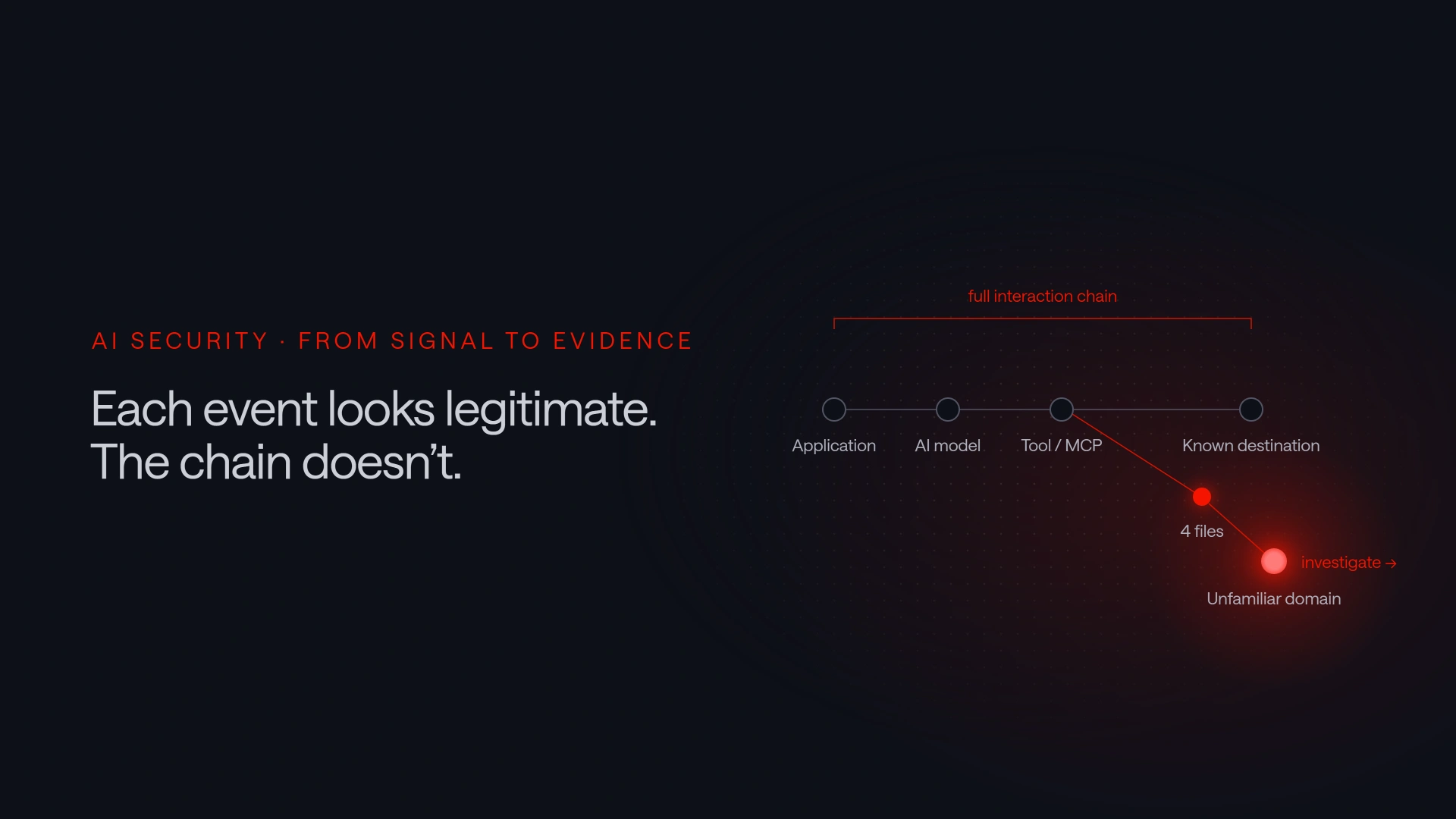

AI data leakage rarely begins with a single, obviously suspicious event. AI interactions typically span several systems: a model may receive information from an application, invoke a tool, and send context to an external service.
In part one of this series, we examined the broader visibility gap, including how ordinary AI use can expose business information. This second article moves from the problem to investigation and focuses on four practical use cases for security teams, from AI data leakage and shadow AI to MCP servers and agents that move beyond their expected scope.
Across all four, the central question is not whether one event looks unusual. It is whether the data, tools, destinations, and resulting actions make sense for the relevant application, agent, or approved workflow.
Four AI security use cases that require behavioral context
1. Detecting potential AI data leakage
To detect AI data leakage, security teams need to identify credentials, sensitive information, or files sent to AI models and external resources. Useful evidence includes the source application or relevant account context, the model, the destination, the file involved, and the outgoing data volume.
Consider an approved enterprise assistant that normally handles short text requests within a defined business workflow. A new interaction uploads several spreadsheets and sends a much larger volume of information to an unfamiliar external domain.
A detection rule may identify sensitive data or a restricted destination. Behavioral analysis adds another layer by showing that the transfer differs from established patterns for the application or workflow.
The signal does not prove that someone intended to disclose information. It provides a reason to investigate while the destination, file, and interaction context are still available.
2. Finding shadow AI before applying broad restrictions
Personal AI accounts and newly adopted tools may enter business workflows before those services complete a security review. Visibility into model providers and AI applications can help organizations compare actual usage with approved policy.
The objective should not be to block every new tool by default. Security and governance teams first need a reliable inventory, including where each service is used, whether it is approved and what categories of information reach it. That evidence supports proportionate decisions rather than broad restrictions based on assumptions.
3. Understanding MCP servers and connected tools
MCP servers, APIs and other connected tools extend what an agent can reach. A security team should be able to see which services are contacted, which workflows invoke them, how frequently they are called and what data passes through them.
An MCP server used widely across approved development workflows presents a different situation a newly observed server contacted shortly before an unusual file transfer that could point to AI data leakage. Neither is automatically safe or malicious. The relationship between the server, the workflow, the data and the subsequent action determines whether the activity deserves investigation.
Request volumes provide useful context as well. A sudden increase may reflect a legitimate rollout, a changed automation or an agent repeatedly invoking a tool in an unintended loop. The number alone is not the conclusion. It helps analysts decide where to look.
4. Detecting when an agent moves beyond its expected scope
An agent’s permissions describe what it can do. Its activity shows what it actually does.
Consider an operations agent that normally reads monitoring data and prepares a suggested response. If it begins calling a deployment API, accessing a production folder or transferring diagnostic files to an unfamiliar service, each action may still use valid credentials and an approved interface. The change appears in the sequence and context.
Behavioral learning can establish expected patterns across agents, applications, workflows, tools, folders, external resources and MCP servers. A meaningful deviation can then produce an alert even when no known malicious command is present.
This is especially relevant for coding and operations agents, where legitimate and potentially damaging activity may use the same administrative tools.
Why an unusual event is not automatically an incident
Context matters because enterprise environments change. Teams adopt new tools, applications are updated and workflows expand. A previously unseen domain or tool call may be entirely legitimate.
Effective detection should therefore help analysts answer three questions:
- What changed?
- Which data, tools and destinations were involved?
- Does the activity make sense for the application, agent or approved workflow?
This approach reduces the temptation to treat every deviation as malicious. It also avoids turning security telemetry into an assessment of employee productivity or performance. The subject of the analysis is the security-relevant interaction and data flow.
Detection complements access control
Visibility and detection do not replace secure architecture. Organizations still need least-privilege access, approval steps for high-impact actions, separation between development and production, secure software-development practices, backups and tested incident-response procedures.
The OWASP guidance on excessive agency recommends limiting agent extensions, functionality and permissions to what is necessary, requiring human approval for high-impact actions and enforcing authorization in downstream systems. It also identifies logging and monitoring as measures that can help organizations discover and respond to undesirable actions.
These controls address different questions. Preventive controls define what should be possible. Detection and investigation help establish what happened and whether the activity remained within its expected purpose.
Both are necessary when agents can act through legitimate identities and approved tools.
From AI activity to evidence with Exeon.AgentGuard
The four use cases share one requirement: security teams need to connect isolated events into an understandable interaction chain.
Exeon.AgentGuard is designed to provide this context across AI models, agents, applications, tools, MCP servers, files and external resources. Depending on the available data sources, it can use web-proxy, AI-gateway or log data to connect outgoing information with the relevant model, destination and workflow, providing the evidence needed to investigate potential AI data leakage.
Adaptable detection rules identify known risk patterns, while behavioral analysis can highlight meaningful changes across applications, agents and AI workflows. Local processing, anonymization and deduplication help retain the evidence required for investigation without sending the monitoring dataset to an external analysis service.
The purpose is not to score individuals or classify every unusual action as an attack. It is to give security teams enough evidence to determine when AI use or agent activity has moved beyond expected boundaries.
Visibility should grow with authority
Organizations are moving from AI experimentation toward systems that can retrieve information and act on it. As that authority grows, so does the risk of AI data leakage, and security teams need evidence across the full interaction chain, from the original request to the model, file, tool and external destination involved.
The objective is not to prevent useful automation. It is to make AI activity understandable enough that teams can distinguish expected work from activity that deserves investigation.
Permission explains what an agent is allowed to do. Context reveals whether it stayed within that purpose.



